
If you are an MSP Admin, you will be able to filter your Clients based on two parameters – Status and Social.
You just need to click on the Filters dropdown and you will get presented with the Filters bar showing two dropdowns:
- Status – Active, Inactive
- You will see the number of Clients that have these statuses and you can choose to filter out only the active or the inactive ones.
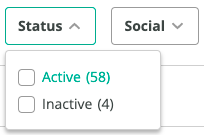
- Social – No Social, Any Social
- You will see the number of Clients that have these statuses and you can choose to filter out only the ones that have any social network connected or not.
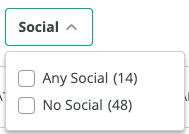
The relation between the items inside the dropdown is OR, whereas the relation between the dropdowns is AND.
Please note that in case all the Clients have the same status, e.g they are all Active or Inactive, the Filter dropdown will be disabled.
Comments
0 comments
Please sign in to leave a comment.